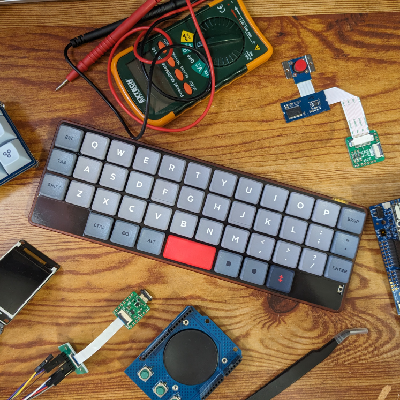

Just built my first ortholinear keyboard!
Keyboard/case: Ortho60v2 from #cannonkeys (https://cannonkeys.com/products/ortho60)
Switches: #akko Rose Red (https://en.akkogear.com/product/akko-cs-rose-red-switch/)
Keycaps: Custom order from #kromekeycaps (https://www.kromekeycaps.com/)
Nice! That’ll look great on a shelf!
How do you know you’re pressin’ the right keys?
Askin’ for a different guy.

The little bumps on the F and J keys
I see them now!! Okay, that probably helps with staying centered and knowing where your hands are when typing!
Man, the human mind is something else. Not my human mind, but other people’s minds.
Thank you!
The only reason most keyboards are not ortholinear is because of tradition and typewriters.
@SharkEatingBreakfast @alex the right thing shows up on your computer?
Okay, so… trial & error?
The first few days, yes, but there’s nothing better than blank keycaps when it comes to learning how to type without looking at the keyboard all the time.
It’s adapt or die, basically.
OH! Y’all memorize the keys?? That’s amazing!!
@alex @mechanicalkeyboards welcome down the rabbit hole.
deleted by creator
That is pretty
@urquell Thank you!
What does the Ortho moniker actually mean? ( Yes I am embarrassed I don’t know). This looks extra cool to me because I am terrible at soldering, and would like to improve. Can you post some pics of your switch recepticle solders?
Ortho linear means all the keys are arranged vertically and straight, with no key offset like you’d find in regular keyboards. The idea is you can type faster (after getting used to it), and offset keys are no longer necessary since we don’t use typewriters anymore.
I always wonder, what is the purpose of two space bars? It looks amazing BTW the keycaps a beautiful.
Make one of them delete or backspace so you don’t have to move your right hand so far off center.
Well originally I intended to bind the left spacebar to space and the right spacebar to escape for when I’m using Helix editor (similar keybindings to Vim) to make escape faster to press. But I’ve found having the escape key in the first column second row beside my pinky to be very comfortable, so right now I have both of the keys set to space. But I am still editing what keys are where so this may well change.
I’m glad you like the keycaps by the way, I’m very happy with how they turned out.Thanks for the explanation, what are your thoughts of an otholinear keyboard does it feel more ergonomic that a traditional layout?
I’m enjoying it so far, I’ve had to adjust a few cases where I was using the wrong finger for a key and had to fix that when switching to this keyboard. My typing speed has improved but that may just be the lighter switches. As for any ergonomic benefit, this smaller board is more comfortable to type on and I feel like the ortholinear layout makes it better as well but that second one could be placebo. Also I just enjoy typing on this keyboard more which certainly helps.
That sounds pretty cool, i might like to try one at some point.