

I want to make a 4k game video for Youtube but I only have access to a 1440p monitor. On Windows I could use DSR, how do I do this in Linux? Kubuntu, KDE Plasma 6.4.5, RTX 2080, Nvidia driver version 580.95.05
You can use gamescope to set a higher or lower resolution and it’ll down or up scale it to your screen.
I presume you can use obs or something like that to record the raw footage before scaling.
ok I installed gamescope, and set my launch options (for Deus Ex)
gamescope -w 3840 -h 2160 -W 2560 -H 1440 -b -- %command%It seems like it sorta works, Kentie’s Launcher is big (like when I tried this in Bazzite’s Gaming Mode), and the 3840x2160 resolution is an available option, but when I try to launch the game and Kentie’s Launcher closes to launch the game, gamescope just dies and the game never starts
EDIT: I have a workaround by just skipping the config dialog
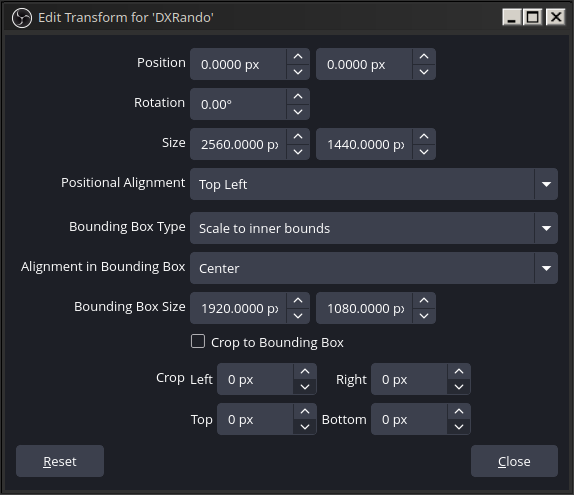
gamescope -w 3840 -h 2160 -W 2560 -H 1440 -b -- %command% -skipdialogBut OBS is only capturing at 2560x1440, so this idea doesn’t work
did you try this?
https://github.com/nowrep/obs-vkcapture
you need to capture the game not the gamescope instance.
I did try this but I couldn’t get it working with Flatpak OBS and native Steam. I even built it from source and added obs-gamecapture to the Steam game’s launch command
It works just fine for me. What are the steps that you did?
I use nix so:
- I installed OBS with all the plugins especially
obs-vscapture - Run OBS and add
Game CaptureSource - Using lutris I enabled gamescope and changed the game resolution to something higher. I have a 1440p display so I tried 2560x1600 (16:10) to make sure I’m capturing it right.
- Inside Lutris
System Optionsgame options tab I addedOBS_VKCAPTUREand set it to1. - When I run the game I can see gamescope is working as it’s projecting a 16:10 game onto my 16:9 screen.
- Inside OBS I can see the game capture is working and when I select the
Game Capturesource it shows that it’s a bit too tall for my display.
Should be a similar thing for you, I would try something obvious like 16:10 first so you can get immediate visual feedback and then tweak your settings from there.
- I installed OBS with all the plugins especially
Use 3840 for both
-wand-W?gamescope -w 3840 -h 2160 -W 3840 -H 2160 -b -- %command% -skipdialogInstruction:
[gamescope] [Info] console: gamescope version 3.16.19 (gcc 15.2.1) usage: gamescope [options...] -- [command...] Options: --help show help message -W, --output-width output width -H, --output-height output height -w, --nested-width game width -h, --nested-height game heightthat works but then it doesn’t fit on my screen so I can’t see what I’m doing in the game lol
You can still play through OBS’s viewport lol
in OBS you can scale the viewport to fit your screen.
That’s true! I’ll probably do that lol, thanks
This ALMOST works lol. The problem is the center of the game is off-screen, and the game tries to keep the mouse centered in its center, so my camera just spins like crazy lol
Maybe I can fix this with some abuse of my multi monitor layout
Nice bro.
Can confirm that my producer and I use a 1440p resolution, but downscale to 1080p, or even 936p (if you’re on platforms that limit bandwidth).
Ive seen resolution tinkering with the Nvidia driver on Windows. Its doubtful that the proprietary driver would allow it, on Linux.
What if I switch to the Nouveau drivers? Deus Ex would probably still run well enough, so if they can do custom resolutions that could help
If you do that its more likely, although im not exactly sure how to implement the tinkering. Sorry


